The new place for the Indie Game Journal
Don't forget to update your bookmarks (if you had it)!
Showing posts with label Code. Show all posts
Showing posts with label Code. Show all posts
RGB gradient
Adding a for loop to the last piece of code, I made a series of gradients:
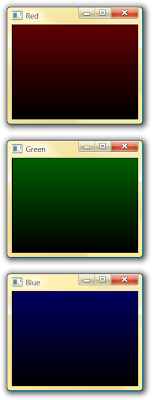
The code hasn't been edited much. Just added one for loop to draw scan lines of the same color (that gives another idea). However, the coordinates are set to 200 x 150 where as the window size is set to 400 x 300. This makes the code to draw like this:
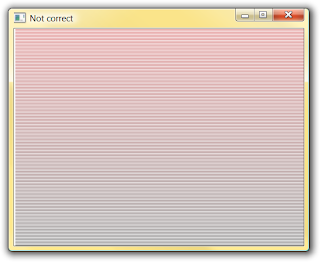
This is not correct. If you click on the image, it will show it full size, where every other line is left totally blank. So, I edited the window size to be 200 x 150 too. Although, I could have changed the coordinates range too.
Another note, for this wrong example, I edited the background to white, like the previous code, instead of keeping it black in the correct versions.
Here's the code:

The code hasn't been edited much. Just added one for loop to draw scan lines of the same color (that gives another idea). However, the coordinates are set to 200 x 150 where as the window size is set to 400 x 300. This makes the code to draw like this:

This is not correct. If you click on the image, it will show it full size, where every other line is left totally blank. So, I edited the window size to be 200 x 150 too. Although, I could have changed the coordinates range too.
Another note, for this wrong example, I edited the background to white, like the previous code, instead of keeping it black in the correct versions.
Here's the code:
#include <GL/glut.h>

void init (void) {
    glClearColor (1.0, 1.0 ,1.0, 0.0);

    glMatrixMode (GL_PROJECTION);
    gluOrtho2D (0., 200.0, 0.0, 150.0);    // the coordinate range
}

void lineSegment (void) {

    int count;
    float col = 0.0;

    glClear (GL_COLOR_BUFFER_BIT);
    glBegin (GL_LINES);
        for (count = 0; count < 201; count += 1){
            glColor3f (col, 0.0, 0.0);
            glVertex2i (1, count);
            glVertex2i (200, count);
            col = col + 0.005;
        }
    glEnd();

    glFlush();
}

void main (int argc, char** argv) {
    glutInit(&argc, argv);
    glutInitDisplayMode (GLUT_SINGLE | GLUT_RGB);
    glutInitWindowPosition (50, 100);    // top-left window position
    glutInitWindowSize(200, 150);    // window size
    glutCreateWindow ("Red");

    init();
    glutDisplayFunc (lineSegment);
    glutMainLoop ();
}
First OpenGL program
Today I created my first ever OpenGL program. I had this book for ages but haven't been able to understand even the basics. But, today (night, actually), thanks to Allah, I have been able to make a program. And it does an amazing thing, which no other program has ever done before. Thats right. It prints my nick on the screen. :D
Screenshot:

Here is the source code:
Screenshot:

Here is the source code:
#include <GL\glut.h>

void init (void) {
    glClearColor (1.0, 1.0 ,1.0, 0.0);  // set display window color to white

    glMatrixMode (GL_PROJECTION);       // set projection parameters
    gluOrtho2D (0., 200.0, 0.0, 150.0);
}

void draw1Line (int x1, int y1, int x2, int y2) {
    glBegin (GL_LINES);
        glVertex2i (x1, y1);
        glVertex2i (x2, y2);
    glEnd();
}

void lineSegment (void) {
    glClear (GL_COLOR_BUFFER_BIT);      // clear display window

    glColor3f (1.0, 0.0, 0.0);          // set line segment color to red

    // specify line segment geometry
    draw1Line (10,90,35,90);
    draw1Line (10,90,10,65);
    draw1Line (10,65,35,65);
    draw1Line (35,65,35,40);
    draw1Line (10,40,35,40);
    draw1Line (45,40,45,90);
    draw1Line (45,90,69,90);
    draw1Line (69,90,69,65);
    draw1Line (69,65,45,65);
    draw1Line (45,65,70,40);
    draw1Line (80,40,80,90);
    draw1Line (80,90,92,65);
    draw1Line (92,65,104,90);
    draw1Line (104,90,104,40);

    glFlush();           // Process all OpenGL routines as quickly as possible
}

void main (int argc, char** argv) {
    glutInit(&argc, argv);          // initialize glut
    glutInitDisplayMode (GLUT_SINGLE | GLUT_RGB);    // set display mode
    glutInitWindowPosition (50, 100);   // set top-left display window position
    glutInitWindowSize(400, 300);       // set display window size
    glutCreateWindow ("SRMROX!");       // create display windows

    init();                             // initialize procedure
    glutDisplayFunc (lineSegment);      // send graphics to display window
    glutMainLoop ();
}
Subscribe


 Posts
All Comments
Posts
All Comments